Colombia
  • Global
  • México
  • 中國台灣
  • India
  • Indonesia
  • Türkiye
  • Việt Nam
  • ประเทศไทย
  • Brasil
  • Perú
  • Colombia
  • Argentina
  • Россия
  • السعودية
  • مصر
  • پاکستان
  • Malaysia
  • 日本
  • 中国香港
  • Philippines
Descargar
liteCam Game: 100 FPS Game Capture

liteCam Game: 100 FPS Game Capture

46 Positivo / 346 Calificaciones | Versión: 1.0.0

Rsupport Inc.

Comparación de precios
  • United States
    $14.99$14.99
    Ir a la tienda
  • Turkey
    $0.86$0.86
    Ir a la tienda
  • Russia
    $3.58$3.58
    Ir a la tienda

Descarga liteCam Game: 100 FPS Game Capture en PC con GameLoop Emulator


liteCam Game: 100 FPS Game Capture, es un popular juego de Steam desarrollado por Rsupport Inc.. Puede descargar liteCam Game: 100 FPS Game Capture y los mejores juegos de Steam con GameLoop para jugar en la PC. Haga clic en el botón 'Obtener' para obtener las últimas mejores ofertas en GameDeal.

Obtén liteCam Game: 100 FPS Game Capture juego de vapor

liteCam Game: 100 FPS Game Capture, es un popular juego de Steam desarrollado por Rsupport Inc.. Puede descargar liteCam Game: 100 FPS Game Capture y los mejores juegos de Steam con GameLoop para jugar en la PC. Haga clic en el botón 'Obtener' para obtener las últimas mejores ofertas en GameDeal.

liteCam Game: 100 FPS Game Capture Funciones

Discover the ultimate game recorder - liteCam Game: 100FPS Game Capture!

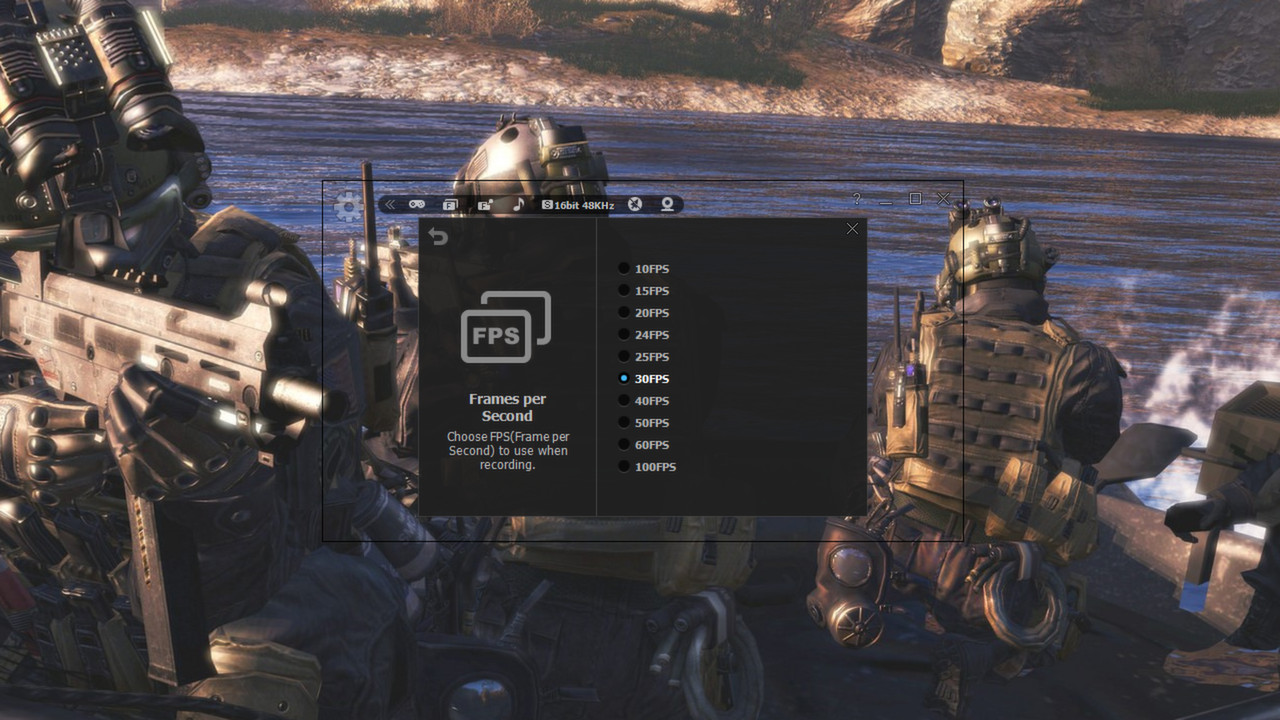
‘liteCam Game: 100FPS Game Capture’ is a next-gen game recording software for Steam users. ‘liteCam Game: 100FPS Game Capture’ has a minimal impact on actual game performance while recording and can record up to 100 FPS. You can record most DirectX 7, 8, 9, 10, 11 and OpenGL games such as League of Legends, World of Warcraft, Minecraft, Need for Speed, GTA , Grid 2 and many more pc games with no lag.

liteCam Game Official Website: http://www.litecam.net/en/product/litecam-game/

Why 'liteCam Game: 100FPS Game Capture' is the best game recording software?

First, ‘liteCam Game: 100FPS Game Capture’ ensures that your recorded game video has a stunning HD vibrantly colored. By default, it captures your game footage at 100FPS for the smoothest videos.

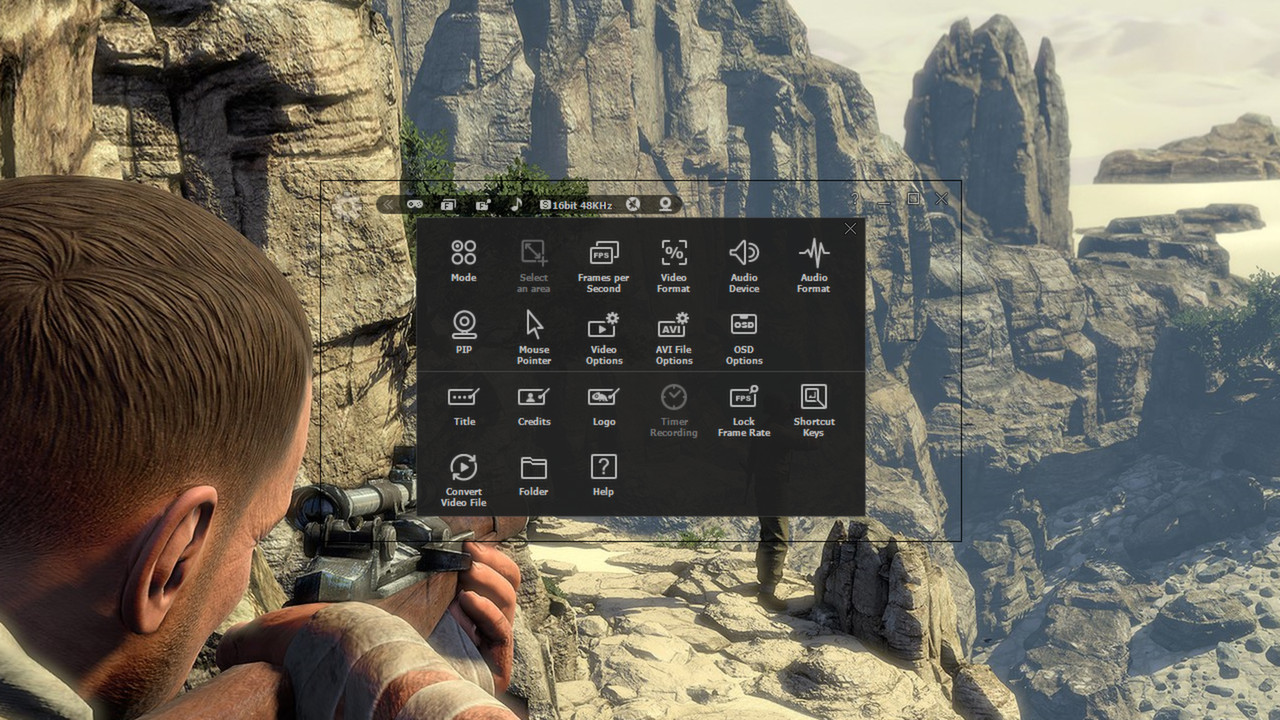
Second, ‘liteCam Game: 100FPS Game Capture’ consists of an easy-to-use interface to record gameplay instantly. You can easily record your webcam video with live commentary, so no need to look for webcam recording software.

Third, ‘liteCam Game: 100FPS Game Capture’ has no time limit on capturing your game play with a small file size.

Fourth, you can customize the recording option. ‘liteCam Game: 100FPS Game Capture’ allows you to import your preferred codec and use it to record your gameplay.

Fifth, ‘liteCam Game: 100FPS Game Capture’ saves the recorded videos in AVI file format. Inside the program, there is a converter function, so you can easily convert your videos to MP4 and WMV without interruption. ‘liteCam Game: 100FPS Game Capture’ also supports direct upload to YouTube from your computer.

Sixth, ‘liteCam Game: 100FPS Game Capture’ does not require the video editing software. You can simple trim the part of your recorded videos in the preview mode with a simple mouse movement. Also you can add video titles, ending credits and your pictures quickly.

Please note that ‘liteCam Game: 100FPS Game Capture’ might drop frames when recording if your computer becomes overburdened or the game play limit FPS less than 100FPS. Here is recommended hardware spec to improve performance;

CPU:

Intel Core i7 and above

Intel Core i5 4670 and above

Graphic card/Video card:

GetForce GTX 760 and above

Radeon R9 270X and above

For Windows 7 and above

Use SSD storage

Amazing Features from ‘liteCam Game: 100FPS Game Capture’

  • Game Recording: Capture any game play with ‘liteCam Game: 100FPS Game Capture’. It can Capture most DirectX 7, 8, 9, 10, 11 and OpenGL games

  • Video Recording: ‘liteCam Game: 100FPS Game Capture’ can record any video on the user computer screen. Record videos from YouTube, Hulu, Vimeo, Daily Motion, and etc

  • Trimming: ‘liteCam Game: 100FPS Game Capture’ is equipped with a simple trimming tool. User can trim any video they recorded.

  • Adding logos, credits, and title: No other recording software can let you add logos, credits, and title except 'liteCam Game: 100FPS Game Capture'.

  • Converting Tools: ‘liteCam Game: 100FPS Game Capture’ produces AVI video files. At the same time with 'liteCam Game: 100FPS Game Capture' you can convert recorded videos to MP4 or WMV

  • Webcam --> PIP: ‘liteCam Game: 100FPS Game Capture’ has a PIP function for users to show their active speech while capturing Game play or recording videos. This will surely build up the trust on your videos.

  • Upload to YouTube: ‘liteCam Game: 100FPS Game Capture’ can directly upload recorded videos to YouTube.

  • Timer Recording: ‘liteCam Game: 100FPS Game Capture’ can help you schedule your video recording. You can set 'liteCam Game: 100FPS Game Capture' to record any video you want.

  • Hotkey Recording: ‘liteCam Game: 100FPS Game Capture’ will let you use Hotkeys to help provide an easier and usually quicker method of navigating when recording Games.

  • Screen Capture: User can capture screenshots of videos and games and save them as PNG, BMP, or JPG files format

Users' Video in YouTube

LITECAM VS FRAPS top game capture softwares

http://www.youtube.com/watch?v=r1A3JHvKkjY

Testing out new screen recorder - Amazing Quality

http://www.youtube.com/watch?v=HZ5By0fRjOY

CoH 2 on Dell Inspiron n5110

http://youtu.be/JwQACpKx41c

Mostrar más

Descarga liteCam Game: 100 FPS Game Capture en PC con GameLoop Emulator

Obtén liteCam Game: 100 FPS Game Capture juego de vapor

liteCam Game: 100 FPS Game Capture, es un popular juego de Steam desarrollado por Rsupport Inc.. Puede descargar liteCam Game: 100 FPS Game Capture y los mejores juegos de Steam con GameLoop para jugar en la PC. Haga clic en el botón 'Obtener' para obtener las últimas mejores ofertas en GameDeal.

liteCam Game: 100 FPS Game Capture Funciones

Discover the ultimate game recorder - liteCam Game: 100FPS Game Capture!

‘liteCam Game: 100FPS Game Capture’ is a next-gen game recording software for Steam users. ‘liteCam Game: 100FPS Game Capture’ has a minimal impact on actual game performance while recording and can record up to 100 FPS. You can record most DirectX 7, 8, 9, 10, 11 and OpenGL games such as League of Legends, World of Warcraft, Minecraft, Need for Speed, GTA , Grid 2 and many more pc games with no lag.

liteCam Game Official Website: http://www.litecam.net/en/product/litecam-game/

Why 'liteCam Game: 100FPS Game Capture' is the best game recording software?

First, ‘liteCam Game: 100FPS Game Capture’ ensures that your recorded game video has a stunning HD vibrantly colored. By default, it captures your game footage at 100FPS for the smoothest videos.

Second, ‘liteCam Game: 100FPS Game Capture’ consists of an easy-to-use interface to record gameplay instantly. You can easily record your webcam video with live commentary, so no need to look for webcam recording software.

Third, ‘liteCam Game: 100FPS Game Capture’ has no time limit on capturing your game play with a small file size.

Fourth, you can customize the recording option. ‘liteCam Game: 100FPS Game Capture’ allows you to import your preferred codec and use it to record your gameplay.

Fifth, ‘liteCam Game: 100FPS Game Capture’ saves the recorded videos in AVI file format. Inside the program, there is a converter function, so you can easily convert your videos to MP4 and WMV without interruption. ‘liteCam Game: 100FPS Game Capture’ also supports direct upload to YouTube from your computer.

Sixth, ‘liteCam Game: 100FPS Game Capture’ does not require the video editing software. You can simple trim the part of your recorded videos in the preview mode with a simple mouse movement. Also you can add video titles, ending credits and your pictures quickly.

Please note that ‘liteCam Game: 100FPS Game Capture’ might drop frames when recording if your computer becomes overburdened or the game play limit FPS less than 100FPS. Here is recommended hardware spec to improve performance;

CPU:

Intel Core i7 and above

Intel Core i5 4670 and above

Graphic card/Video card:

GetForce GTX 760 and above

Radeon R9 270X and above

For Windows 7 and above

Use SSD storage

Amazing Features from ‘liteCam Game: 100FPS Game Capture’

  • Game Recording: Capture any game play with ‘liteCam Game: 100FPS Game Capture’. It can Capture most DirectX 7, 8, 9, 10, 11 and OpenGL games

  • Video Recording: ‘liteCam Game: 100FPS Game Capture’ can record any video on the user computer screen. Record videos from YouTube, Hulu, Vimeo, Daily Motion, and etc

  • Trimming: ‘liteCam Game: 100FPS Game Capture’ is equipped with a simple trimming tool. User can trim any video they recorded.

  • Adding logos, credits, and title: No other recording software can let you add logos, credits, and title except 'liteCam Game: 100FPS Game Capture'.

  • Converting Tools: ‘liteCam Game: 100FPS Game Capture’ produces AVI video files. At the same time with 'liteCam Game: 100FPS Game Capture' you can convert recorded videos to MP4 or WMV

  • Webcam --> PIP: ‘liteCam Game: 100FPS Game Capture’ has a PIP function for users to show their active speech while capturing Game play or recording videos. This will surely build up the trust on your videos.

  • Upload to YouTube: ‘liteCam Game: 100FPS Game Capture’ can directly upload recorded videos to YouTube.

  • Timer Recording: ‘liteCam Game: 100FPS Game Capture’ can help you schedule your video recording. You can set 'liteCam Game: 100FPS Game Capture' to record any video you want.

  • Hotkey Recording: ‘liteCam Game: 100FPS Game Capture’ will let you use Hotkeys to help provide an easier and usually quicker method of navigating when recording Games.

  • Screen Capture: User can capture screenshots of videos and games and save them as PNG, BMP, or JPG files format

Users' Video in YouTube

LITECAM VS FRAPS top game capture softwares

http://www.youtube.com/watch?v=r1A3JHvKkjY

Testing out new screen recorder - Amazing Quality

http://www.youtube.com/watch?v=HZ5By0fRjOY

CoH 2 on Dell Inspiron n5110

http://youtu.be/JwQACpKx41c

Mostrar más

Avance

  • gallery
  • gallery

Información

  • Desarrollador

    Rsupport Inc.

  • La última versión

    1.0.0

  • Última actualización

    2014-02-24

  • Categoría

    Steam-game

Mostrar más

Reseñas

  • gamedeal user

    Jul 31, 2014

    This video capture software is straightforward in its basic operation and does as advertised. It will- Record your entire session Record your Mic as well as others chatting via in game com's or over Steam calls Record in optimal resolutions that you choose in the menu or not record the voice/com's based on your options and preferences. Over all I am quite satisfied with the performance and overall quality of the videos that come from this software. Some games do record at a better quality than others, but the loss is so marginal that it will not hinder the overall presentation of your video. The sound is recorded in full stereo and without any noticeable volume drops or interference. Now, there are a few small issues that I have come across. When updates come out is is possible that the location of your saved videos will revert back to your main drive (C:\) rather than the one you designated, but a simple fix. At random times for no reason the recording will stop with no input from the user. It just stops... The recording is saved but if you did not notice it stop you will keep going thinking everything is fine and dandy. This usually happens when stating a game or switching a game when the software was running in the background. The on screen menu/status bar seems to disappear while ingame and recording. the recording does NOT pick up the status bar but it helps the user to know if it is recording, paused or stopped. Again if you are recording and the bar disappears IT DOES RECORD and save to the folder selected. I also had an issue with voice quality when recording (coms/chat) being grainy and distant, but that was an audio option I found and corrected. Over all I am quite pleased with this software and do suggest it for anything you may need it for. Watch your recordings because these files get BIG QUICK and is real easy to get carried away and have a 7 gig 1080p video now sucking up your HDD space! Notes: I would like to see a better option menu/settings. There is a voice that tells you when you record and when you stop. But its either on or off a volume control for said voice would be perfect! I also want to see more optimized support for other games. Eg: Star Wars the Old Republic is grainy and less refined than recording Terraria. Why? Not sure just is. Love it tho and would by again if needed.
  • gamedeal user

    Aug 6, 2014

    I wouldn't recommend this recording software to anyone. I was looking for something to record games that FRAPS wouldn't record and this isn't it. At first it worked okay, but I found on long recording sessions that it dropped the frame rate so low that the recording hung at a still frame for 10-15 seconds, skipped to another still frame and hung on it for 10-15. Rinse and Repeat. And this was recording a 16bit indie RPG game. After the July updates it is unusable. I launch it, try to start recording, 1 second of recording and it crashes. The only fix mentioned is to go and download a codec, which I did. Didn't fix it. I tried uninstalling and reinstalling, still doesn't work. I'm fed up with it. This software is garbage at this time. I suggest anyone looking for a recording program to buy FRAPS and for the games that FRAPS can't record, use Bandicam. I should have bought Bandicam in the first place. Silly me for trying to support a little developer.
  • gamedeal user

    Nov 4, 2014

    Pros- It records my games, or screen, it does everything the advertisement claims. it doesn't make my in-game framerate drop whatsoever. my computer isn't even set up for gaming, but it handles it like a champ. the only con, is the defualt settings suck. this can be fixed simply by going and fixing it all. its easy to use. I got it on sale for ~$17. its the best capture software I've used. ever. totally worth the $30 they are asking, but get it on sale if you can.
  • gamedeal user

    Nov 29, 2014

    Its decent and you'll have to mess around with it to get what you want out of it it maybe be some trouble but eventually with some help you'll get it to work the way you want.
  • gamedeal user

    Apr 1, 2015

    It's a good [b]game recorder[/b] (not screen recorder, which is their other product). The videos come out pretty well. Price goes way down when it's on sale, get it then.
  • gamedeal user

    Feb 10, 2016

    Do NOT buy this. It doesn't work and doesn't record video. I've tried getting help from the developers on their support pages but have not been answered, nor have any of the other threads claiming the software is broken. It's a total scam. Doesn't work at all, don't buy it.
  • gamedeal user

    Aug 26, 2017

    Just use obs
  • gamedeal user

    Feb 25, 2014

    *This review has been edited after the voice-recording issue had been resolved, and adjusted further after spending a couple more weeks using it. Lots of info here. This review may not change your mind about the software, but it's intended to provide you with the information you need to make that decision. This is a great, cheap product, depending on what you need from it. Records audio and video pretty well, and there's a good variety of codecs to choose from, with some additional options for Picture in Picture and limiting your fps if you need to, adding a watermark and such. Little things like that. To compare this to FRAPS, this will provide you with high-quality visuals if you can afford the harddisk space. The default MPEG-4 codec (which it recommends) will eat up approximately 225-250 MB for 2 minutes of footage (varies on how much is going on visually) at 1080p 30fps. You WILL want to experiment with codecs and bitrates to achieve the best performance for what you need out of whatever you're recording. This is something that FRAPS does not do, as FRAPS uses a custom codec that you'll need to obtain again should you decide to reinstall a fresh OS or uninstall FRAPS. I've enjoyed FRAPS a lot, and consider it a beast as it taxes your PC and requires really hefty hardware and lots of RAM, but it's very simple to use. This software requires more fine-tuning than FRAPS. Experiment and find that sweet spot. To compare this to xSplit Broadcaster/Gamecaster (no, this does not allow live streaming) you can make use of the Picture in Picture functions to place a webcam (adjustable size, but you can only place the PnP in one of 9 spaces, left/center/right from top to bottom, think tic tac toe), This is useful for those of you who may be making videos for YouTube (etc...) and you would like to have a webcam for your face and your voice commentary, and even has Chroma settings for those of you who can use them effectively. xSplit does this as well, but allows you to resize, crop, and place the screens anywhere. xSplit Gamecaster has more of an in-game interface as opposed to xSplit Broadcaster, and there are things in Broadcaster that you can't do in Gamecaster (in regards to window/screen/display positions). Speaking of voice commentary, this brings us to an issue that I had earlier with the software. liteCam has some audio settings that really need some work. If you have multiple voice recording devices plugged in, you cannot change the order of priority/order of those devices. This is where things get tricky and where the real meat of the original version of this revised review was. I use a Logitech G35 USB headset for voice recording/capture, and a Logitech 720p webcam with built-in microphone, and I also have the Screaming Bee audio drivers for modifying my voice. My G35 was set as my default voice communication device as far as my OS was concerned and should have taken priority. liteCam was using the Screaming Bee drivers by default when I had placed the check mark (on liteCam's audio settings) to enable my microphone and did not give me a choice in the matter. Because of this, I could record game audio, but not my voice, and adjusting the settings another way allowed me to record my voice, but not the game audio. It was one or the other, but not both, all because it was picking up the wrong drivers. Again, Screaming Bee isn't physical hardware, it's a device driver I can use to modify my voice, and Windows recognizes my G35 headset as the default voice communication device, but liteCam didn't care or give me the option to choose it. This wasn't fixed until I just up and disabled Screaming Bee. The microphone settings work now, but I'm not entirely sure if it's really recording from my headset or my webcam now. A fix or adjustment to this in the future would be nice. Just for clarification, this was all accomplished hours later after thinking about it and writing an angry email to the devs. The product is still new and there was no actual support in the forums here for it other than "send an email to litecam@rsupport.com THX". Others have complained about stuttering or issues with their FPS. This may be a case by case issue. I've not noticed many problems with my FPS because I'm not running on default settings. My montor doesn't display any higher than 60, so try not to set your settings higher than you can handle. It will give you options to adjust the framerate for your games as well as the recording's framerate. Be sure to adjust both of those values before playing any games. This software also allows you to edit your videos you recorded but your only option is to trim from left or right. You will want to obtain some decent video-editting software. That's a given though. Unless you're just starting out, most of you who would be interested in this software may already have editing software installed. When recording in xSplit, liteCam, or FRAPS, I'll still be running my footage through Vegas or similar programs. Last couple issues: Running the program through Steam will make it difficult to invite to multiplayer games. Exiting liteCam can crash some of your programs. I've had it crash ArmA 3 as well as the Raptr desktop app. A patch came through last night, resolved the crashing issues in one area, but caused another issue elsewhere. Again, your milage may vary, maybe they can fix it, but that's all on them. Finally, there's a woman's voice that says "Recording Ready"/"On"/"Off". It's loud, it's annoying, and there's no way to turn it off. You can't even mute liteCam from your volume mixer. FRAPS is about $40, xSplit is $25/month $60/year $110/3-years and liteCam is $25 when it's not on sale. You can't live stream with it, but it may suit your needs. It is the cheapest of those 3 I've compared it to, and I would almost say it's better than fraps. EDIT: Been using this for a few weeks now. I'm not going back to FRAPS anymore. They have resolved many crashing issues that I had experienced before, and they are still pumping out updates and just released a new codec to use. If they continue to update this software on a more or less semi-regular basis until it's perfect, this one is definitely a keeper. Recorded some footage of Grand Theft Auto Online on Xbox 360 using this software in Video Recording mode on my Hauppauge HD PVR2 (1080p @ 30 fps) for 18 minutes. FRAPS used up 37 GB and this used up about 800 MB before running it through Vegas to knock it down further. 24 Minutes of Little Pink Best Buds prototype on liteCam requred 2 GB. FRAPS would have required more than 55 GB.
  • gamedeal user

    Feb 25, 2014

    Don't waste your money on this garbage. If you need a screen recording software for games, use FRAPs, or anything else, really. This program is awful. I recorded an hour of raw footage and the recording was corrupted at the end. I tried recording numerous times thereafter and each time the recording was either corrupt or had graphical glitches like greyed out pallets or inverted color schemes. I've never actually wanted my money back for anything that I've bought on Steam, but this makes the first time for that. Please do yourself a favor and do not purchase this program. You will regret it if you do.
  • gamedeal user

    Feb 25, 2014

    Needs a LOT of work. I think there's potential...but lots of bugs, and strange behaviors. Crashing things is not unusual, and the file converter appears to be broken entirely. Will have to see how it shapes up with updates down the road.
Load More

preguntas frecuentes

PC Games Cheaper On Gamedeal | Find The Best Deals of Games Here!

Finding the right place to get the best game deals can prove to be quite a hassle when comparing game prices on multiple sites. However, you can skip through all the trouble by letting Gamedeal handle the price comparisons and grab only the best deal prices for you!


We compare game prices on all the trusted storefronts and list game deals starting with the lowest price possible at the moment. Looking for something more specific? Search it on Gamedeal and find all the best deals and cd keys discount codes to make the most out of your bucks. 


Not sure what you looking for? Browse through our massive library of games from different genres to find epic deals for your favorite games from the biggest retailers in the market. Can’t afford the game you are looking for? Make sure to wishlist it and stay up-to-date with all the price changes in the future.


Say Bye to Hefty Game Deals!

Gamedeal is your one-stop shop to find all the best deals from your favorite retailers including Steam, Epic Games, Gamestop, and many more under one roof. Looking for games that cost you nothing? We have got you covered with our free games list that includes free PC and Playstation games.


We help you stay on top of the news with upcoming Steam sales and Gamestop promo codes to ensure you get the game of your choice at the lowest price possible. From old-school classics to modern AAA titles, there is something for everyone to play here.

Más juegos similares

Ver todo
Haga clic para instalar