
Speedpilot para PC
Filippo-Software
Descarga Speedpilot en PC con GameLoop Emulator
Speedpilot en PC
Speedpilot, proveniente del desarrollador Filippo-Software, se ejecuta en el sistema Android en el pasado.
Ahora, puedes jugar Speedpilot en PC con GameLoop sin problemas.
Descárgalo en la biblioteca de GameLoop o en los resultados de búsqueda. No más mirar la batería o llamadas frustrantes en el momento equivocado nunca más.
Simplemente disfrute de Speedpilot PC en la pantalla grande de forma gratuita!
Speedpilot Introducción
Speedpilot
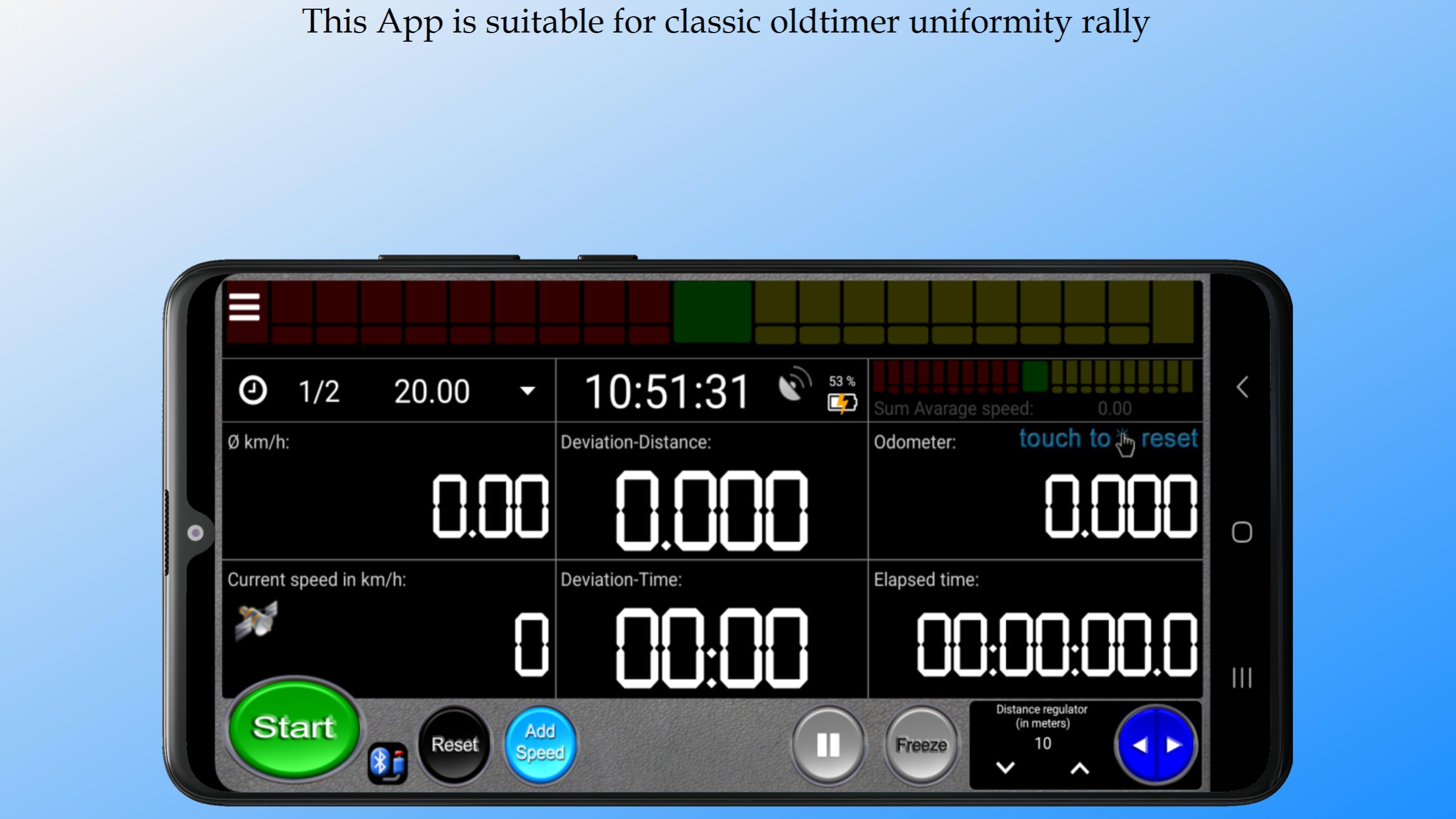
This App is suitable for classic oldtimer uniformity rally.
Speedpilot indicates the average speed not only with nummeri but visually with a progress indicator.
That way it is easier to know whether you are averaging or not.
The clock can be synchronized with GPS, atomic time or manual.
The "Head-Up-Display" function is optionally available via the settings.
This allows the mirrored display to be projected onto a windshield.
Added the function "Share display".
Share the display with a second smartphone/tablet so that the driver also sees the data from the current test.
Progress indicator:
Yellow = above average
Red = below average
Green = on average
App works:
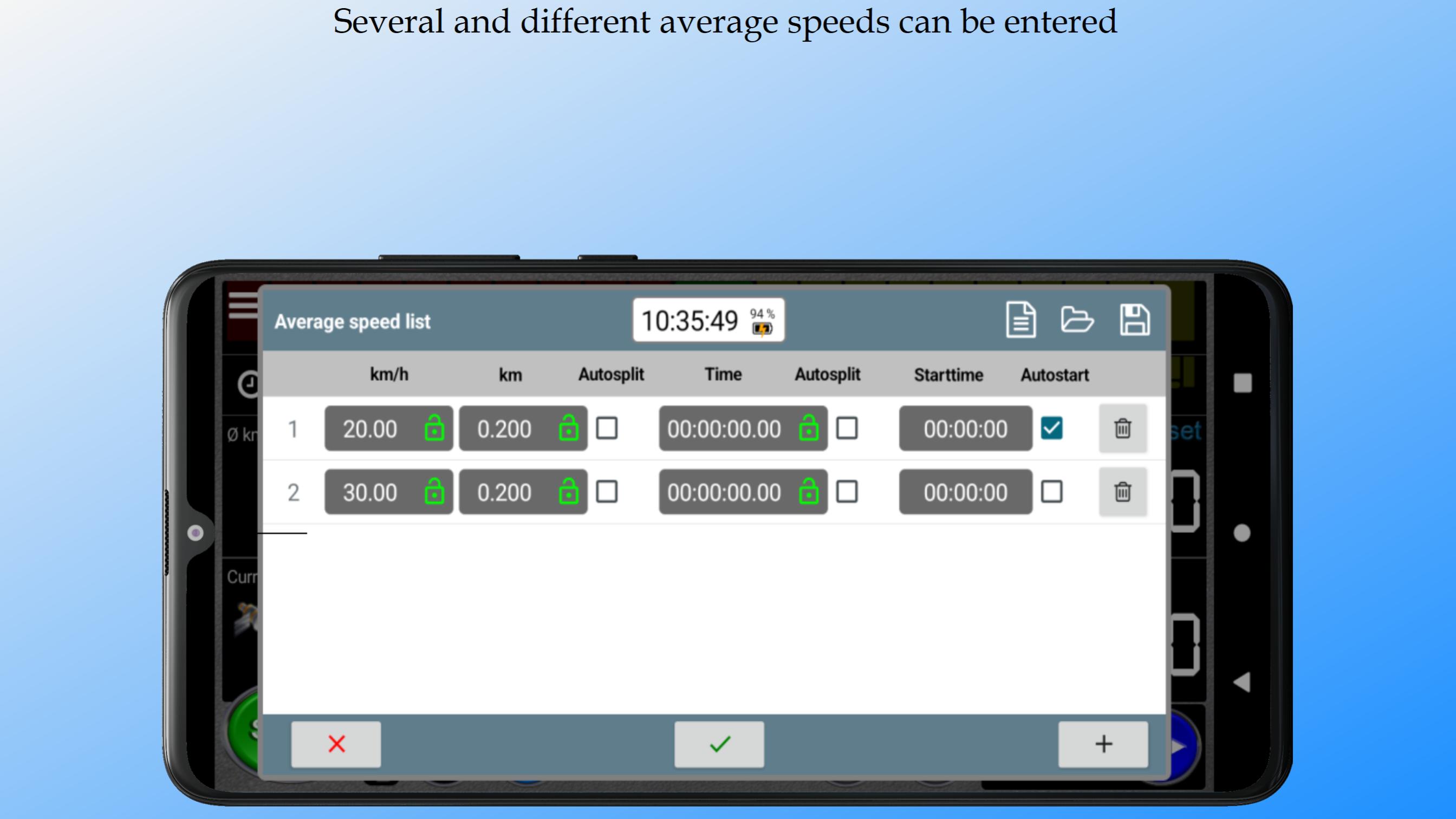
1. enter the average speed before
2. press the button "Start" or the Volume keys DOWN or UP (+ -).
* GPS/GNSS
This app uses GNSS if it is supported by the device.
GNSS is a collective term for the use of existing global satellite systems such as: GPS, GLONASS, Galileo, Beidou.
* Distance measurement with wheel sensor (sensor-kit) or GPS
The app can evaluate / measure the distance traveled with a wheel sensor or with GPS.
Please note that GPS can only provide reliable measurements on open terrain.
Therefore, please do not write negative reviews if the app cannot provide reliable measurements.
For this reason I recommend the use of a wheel sensor (sensor kit) for mountain areas.
For the Start an external device can be used.
The device is available in two versions, USB and Bluetooth.
Further information at: http://filippo-software.de
* A full version can be purchased via the In-App Purchase option.
There are 3 subscriptions to choose from:
- Full-version for 1 year
- Full-version for 6 months
- Full-version for 1 month
* Note! The subscriptions are not renewed automatically.
After expiry, the restrictions in the free version apply again.
* The only limitations of the free version:
The total running time is limited to 5 minutes.
* Disclaimer
Continued use of GPS running in the background can dramatically decrease battery life.
Supported languages:
German, Italian, English
Avance
Etiquetas
deportesInformación
Desarrollador
Filippo-Software
La última versión
6.60
Última actualización
2025-07-27
Categoría
deportes
Disponible en
Google Play
Mostrar más
Cómo jugar Speedpilot con GameLoop en PC
1. Descargue GameLoop desde el sitio web oficial, luego ejecute el archivo exe para instalar GameLoop.
2. Abra GameLoop y busque "Speedpilot", busque Speedpilot en los resultados de búsqueda y haga clic en "Instalar".
3. Disfruta jugando Speedpilot en GameLoop.
Minimum requirements
OS
Windows 8.1 64-bit or Windows 10 64-bit
GPU
GTX 1050
CPU
i3-8300
Memory
8GB RAM
Storage
1GB available space
Recommended requirements
OS
Windows 8.1 64-bit or Windows 10 64-bit
GPU
GTX 1050
CPU
i3-9320
Memory
16GB RAM
Storage
1GB available space