Kustom to the Future for KLWP para PC
BaconBits
Descarga Kustom to the Future for KLWP en PC con GameLoop Emulator
Kustom to the Future for KLWP en PC
Kustom to the Future for KLWP, proveniente del desarrollador BaconBits, se ejecuta en el sistema Android en el pasado.
Ahora, puedes jugar Kustom to the Future for KLWP en PC con GameLoop sin problemas.
Descárgalo en la biblioteca de GameLoop o en los resultados de búsqueda. No más mirar la batería o llamadas frustrantes en el momento equivocado nunca más.
Simplemente disfrute de Kustom to the Future for KLWP PC en la pantalla grande de forma gratuita!
Kustom to the Future for KLWP Introducción
YOU NEED TO HAVE THE PRO VERSION OF KUSTOM KLWP INSTALLED ON YOUR PHONE TO USE THESE KOMPONENTS - https://goo.gl/UkHJ99
THIS IS NOT A STANDALONE APP - IT WILL NOT BE IN YOUR APP DRAWER
WATCH THIS VIDEO BEFORE DOWNLOADING - https://www.youtube.com/watch?v=g0iV8LF7ORQ&feature=youtu.be
Using a komponent
- Open the Kustom KWLP app
- Tap the + icon
- Select Komponent
- Select Kustom to the Future
- Then tap on the komponent you wish to use
- Make Kustom the Live Wallpaper
- Return to homescreen
Instructions to add a new Wallpaper
• Open up Kustom tap the menu icon and select load preset
• Select Kustom to the Future and select the wallpaper
• Select 'Set Kustom as wallpaper and apply' then return to your homescreen
• Make sure dock is disabled in your launcher settings (Recommended for Nova or similar launcher)
• Enjoy
Kustom to the Future features seven Komponents based on elements from the popular movie. These include -
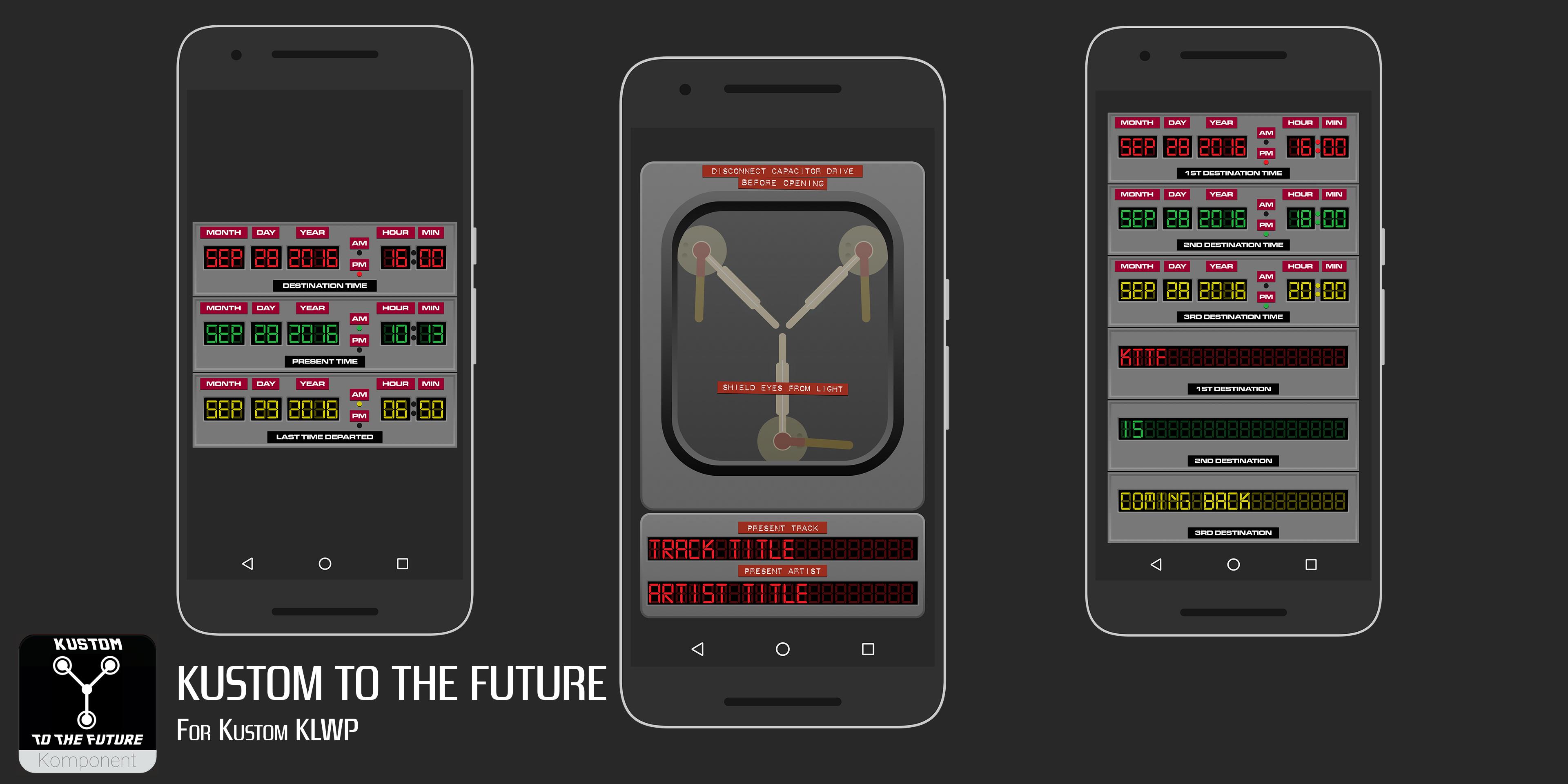
Flux Capacitor - Music Player
Time Circuits - Next calendar event time/date
Current time/date
Next alarm time/date
Time Circuits Event - Time/date & description for next three calendar events
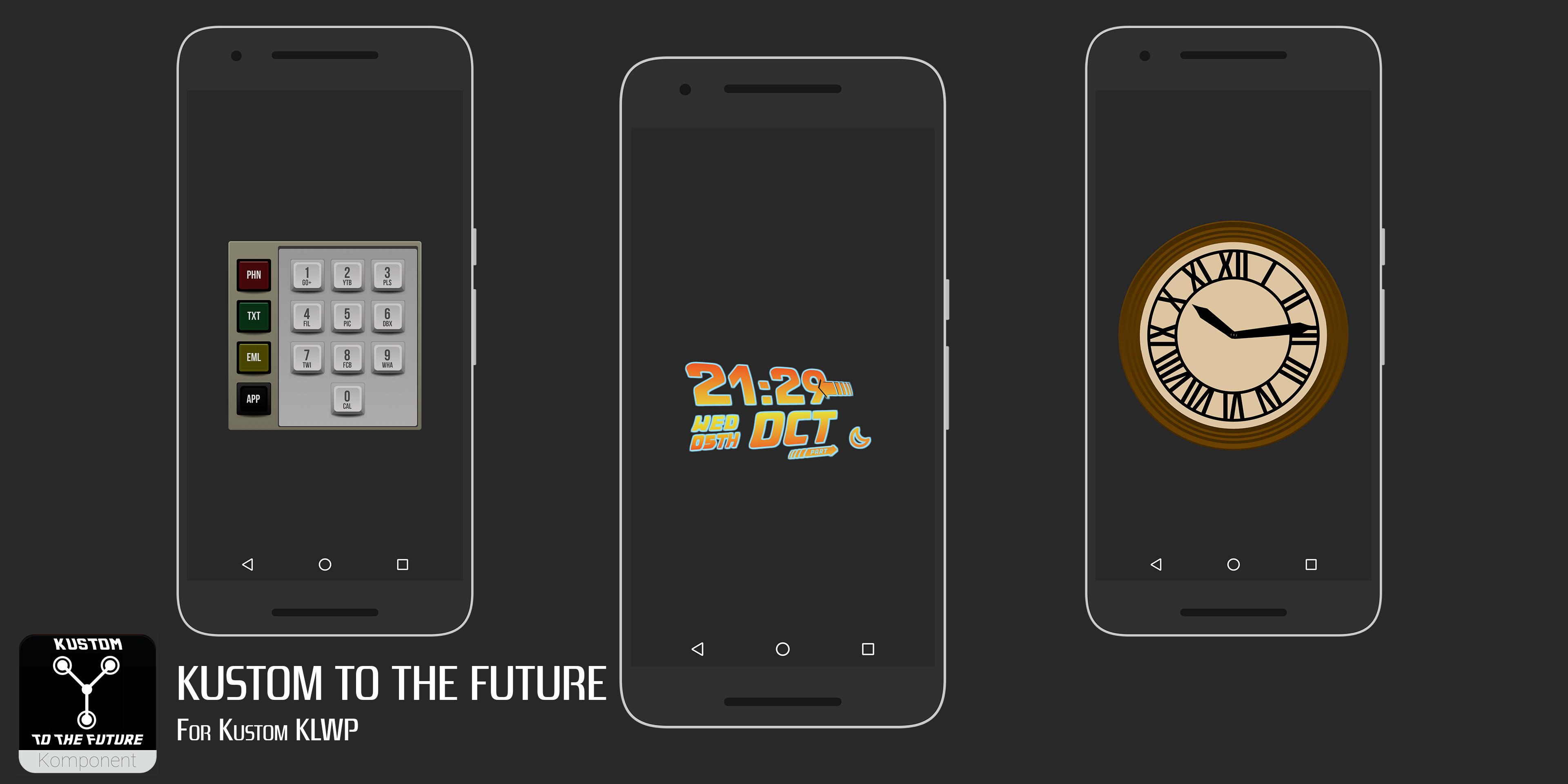
Time circuits keypad - Shortcuts to Phone, SMS, Email & 10 other apps
Logo Clock - Clock based on the film's Logo
Tower Clock - Clock based on the Clock Tower in Hill Valley
Plutonium Gauge - Battery level gauge
Steam Gauge - Battery level gauge
A sample wallpaper is also included with an example setup
KEY FEATURES
--FLUX CAPACITOR---
Tap the bottom flux to Play/Pause
Tap the top left flux to skip to previous track
Tap the top right flux to skip to next track
Artist & Track title shows in bottom
---TIME CIRCUITS---
Top (Red) display shows Date & Time of next calendar event
Middle (Green) display shows current Date & Time
Bottom (Yellow) Display shows next alarm Date & Time
---TIME CIRCUITS EVENT---
Red displays show next event date/time & title
Green displays show 2nd event date/time & title
Yellow display shows 3rd event date/time & title
---TIME CIRCUITS KEYPAD---
Icons on left open phone, SMS, email & Nova Launcher app drawer
The 10 keypad buttons open the following apps
1 - Google+
2 - Youtube
3 - Play Store
4 - ES File Explorer
5 - Quickpic
6 - Dropbox
7 - Twitter
8 - Facebook
9 - Whatsapp
0 - Calendar
---LOGO CLOCK---
Clock and date based on the Logo of the film. Globals to change colours
---TOWER CLOCK---
Simple clock showing time, based on the clock in the Tower in Hill Valley
---PLUTONIUM GAUGE---
Shows current battery level. Based on the Plutonium gauge in the De Lorean
---STEAM GUAGE---
Shows current battery level. Runs clockwise from 100% (White area) to 0% in the red area. Based on the presto log steam gauge in Part III
Use the sample wallpaper included or start a new wallpaper and add the komponents how you wish
Take your phone to 1.21 Gigawatts<\b>
If you have any queries please email me
Enjoy & Thankyou
Find me on Reddit - https://www.reddit.com/user/BaconBitsNI/
or Twitter - https://twitter.com/baconbitskustom
for more Bacon
Avance
Etiquetas
PersonalizaciónInformación
Desarrollador
BaconBits
La última versión
2.0
Última actualización
2017-03-24
Categoría
Personalización
Disponible en
Google Play
Mostrar más
Cómo jugar Kustom to the Future for KLWP con GameLoop en PC
1. Descargue GameLoop desde el sitio web oficial, luego ejecute el archivo exe para instalar GameLoop.
2. Abra GameLoop y busque "Kustom to the Future for KLWP", busque Kustom to the Future for KLWP en los resultados de búsqueda y haga clic en "Instalar".
3. Disfruta jugando Kustom to the Future for KLWP en GameLoop.
Minimum requirements
OS
Windows 8.1 64-bit or Windows 10 64-bit
GPU
GTX 1050
CPU
i3-8300
Memory
8GB RAM
Storage
1GB available space
Recommended requirements
OS
Windows 8.1 64-bit or Windows 10 64-bit
GPU
GTX 1050
CPU
i3-9320
Memory
16GB RAM
Storage
1GB available space