
Pattern Keeper para PC
Datadromeda AB
Descarga Pattern Keeper en PC con GameLoop Emulator
Pattern Keeper en PC
Pattern Keeper, proveniente del desarrollador Datadromeda AB, se ejecuta en el sistema Android en el pasado.
Ahora, puedes jugar Pattern Keeper en PC con GameLoop sin problemas.
Descárgalo en la biblioteca de GameLoop o en los resultados de búsqueda. No más mirar la batería o llamadas frustrantes en el momento equivocado nunca más.
Simplemente disfrute de Pattern Keeper PC en la pantalla grande de forma gratuita!
Pattern Keeper Introducción
With Pattern Keeper you can view and annotate PDF cross stitch charts. There is an initial, month-long, free trial period then there is a one time charge of around 9 USD to continue to use the app.
*DISCLAIMER-IMPORTANT*
The app is still in beta and works great with some charts but will not work with others. Backstitches and fractional stitches are not supported. Scans and images can be used but only with limited functionality.
The app is tested with charts from Paine Free Crafts, Tilton Crafts, Heaven and Earth Designs, Artecy, Charting Creations, Golden Kite, Cross Stitch 4 Everyone, Orenco Originals, Advanced Cross Stitch, and The Cross Stitch Studio. However, there is no guarantee that all charts from these vendors will work. I'm NOT affiliated with any of the listed designers and all questions about compatibility should be posed to me, not the designers.
*END DISCLAIMER*
View your chart as one continuous pattern. Easily stitch over page breaks.
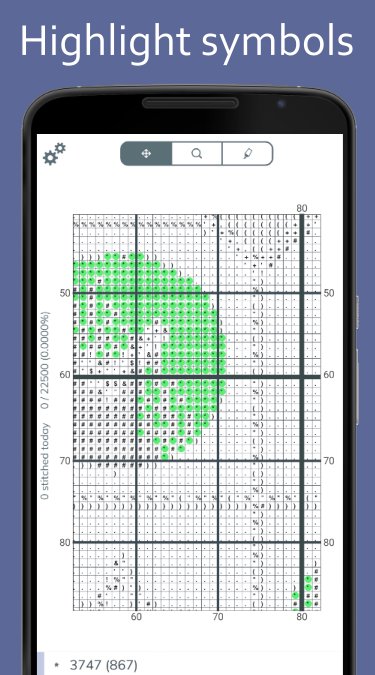
Highlight symbols to see where to stitch. When highlighting, the thread number of that symbol is shown. There is no need to flip back and forth between the chart and the legend.
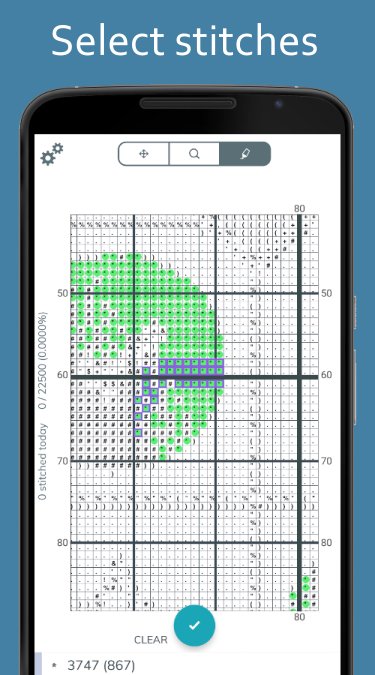
Mark finished stitches. Select easily by swiping horizontally, vertically, or even on the diagonal. It is also possible to mark an entire 10 by 10 square. If you import a chart that already has annotations in it, we try to import that as your current progress. Finished stitches are displayed in color, making it easy to navigate and compare with your stitching.
Mark where you parked your threads and in what corner of the square they are parked.
Keep motivated by tracking your progress. Get a tally of how many stitches you finished, today and in total, and see how many stitches are left for each thread.
Avance
Etiquetas
Estilo de vidaInformación
Desarrollador
Datadromeda AB
La última versión
1.0.0-beta12-minApi21
Última actualización
2025-12-04
Categoría
Estilo de vida
Disponible en
Google Play
Mostrar más
Cómo jugar Pattern Keeper con GameLoop en PC
1. Descargue GameLoop desde el sitio web oficial, luego ejecute el archivo exe para instalar GameLoop.
2. Abra GameLoop y busque "Pattern Keeper", busque Pattern Keeper en los resultados de búsqueda y haga clic en "Instalar".
3. Disfruta jugando Pattern Keeper en GameLoop.
Minimum requirements
OS
Windows 8.1 64-bit or Windows 10 64-bit
GPU
GTX 1050
CPU
i3-8300
Memory
8GB RAM
Storage
1GB available space
Recommended requirements
OS
Windows 8.1 64-bit or Windows 10 64-bit
GPU
GTX 1050
CPU
i3-9320
Memory
16GB RAM
Storage
1GB available space