
Video downloader for Instagram : IG saver+ para PC
UniQ Software
Baixe Video downloader for Instagram : IG saver+ no PC com o emulador GameLoop
Video downloader for Instagram : IG saver+ no PC
Video downloader for Instagram : IG saver+, vindo do desenvolvedor UniQ Software, está rodando no sistema Android no passado.
Agora, você pode jogar Video downloader for Instagram : IG saver+ no PC com GameLoop sem problemas.
Faça o download na biblioteca GameLoop ou nos resultados da pesquisa. Chega de ficar de olho na bateria ou fazer chamadas frustrantes na hora errada.
Apenas aproveite o Video downloader for Instagram : IG saver+ PC na tela grande gratuitamente!
Video downloader for Instagram : IG saver+ Introdução
Video downloader for Instagram : IG saver+ is available now. You can now repost or download videos from instagram with one click. It's very simple and fluid to use. It's created to consume less memory, battery and give good performance. You can use this app for many purpose. Check below if now aware of using it.
How to download video from Instagram using Instagram video downloader app?
In order to download video, You have two options available. You can either pick the first one or second. It depends upon your choice.
The first method is has three steps and second method have two.
👉 Open Video downloader for Instagram and open insta clicking on top right icon. It will open insta if you installed it. If you have not installed it then, please install it.
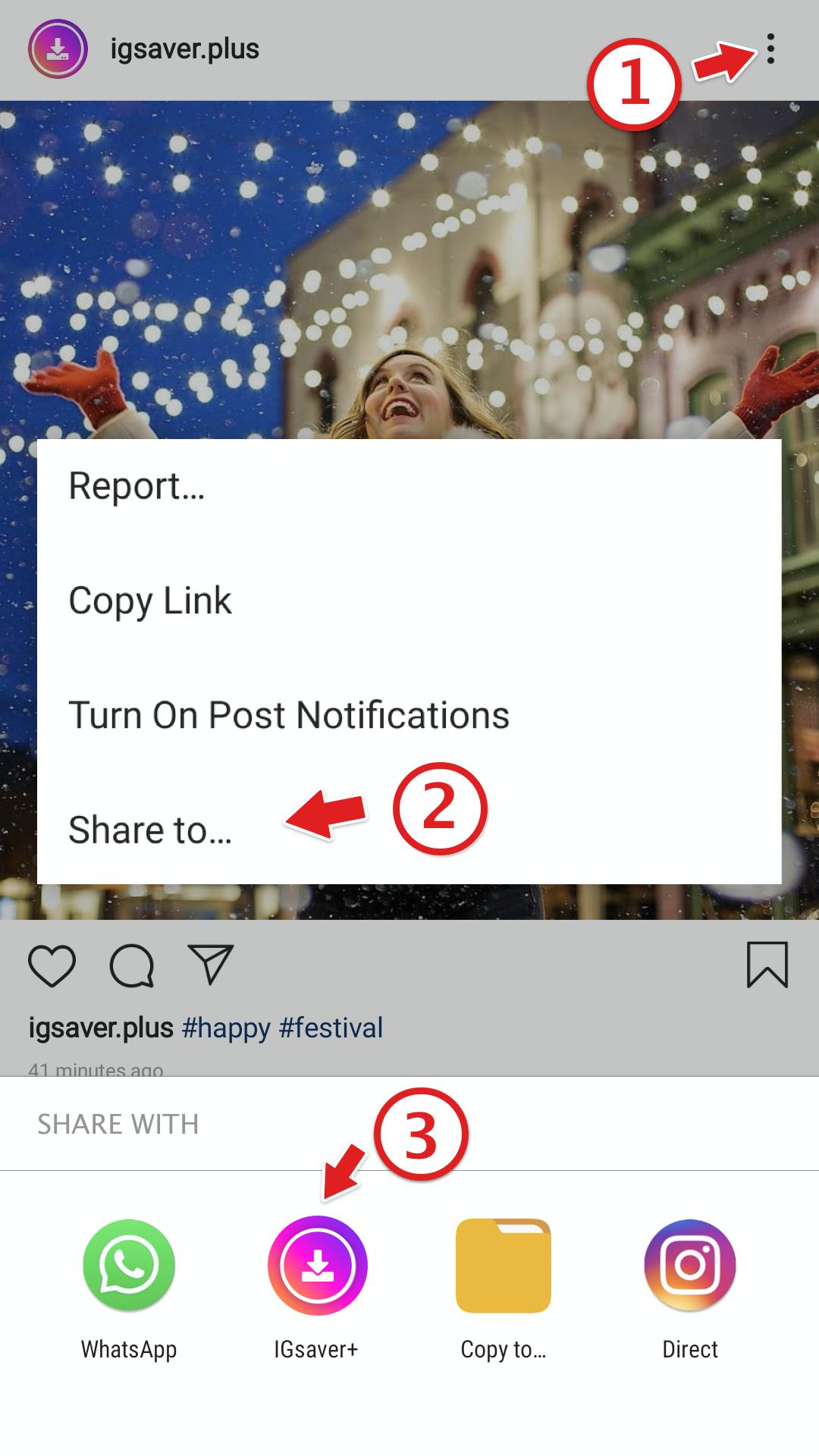
👉 Now Copy post link. If you don't know to copy post link, pho . Here is the method. Click on the three dots appear on the top right corner of the post. There you can see copy link option. Click on that and hurrah! it's copied to your clipboard.
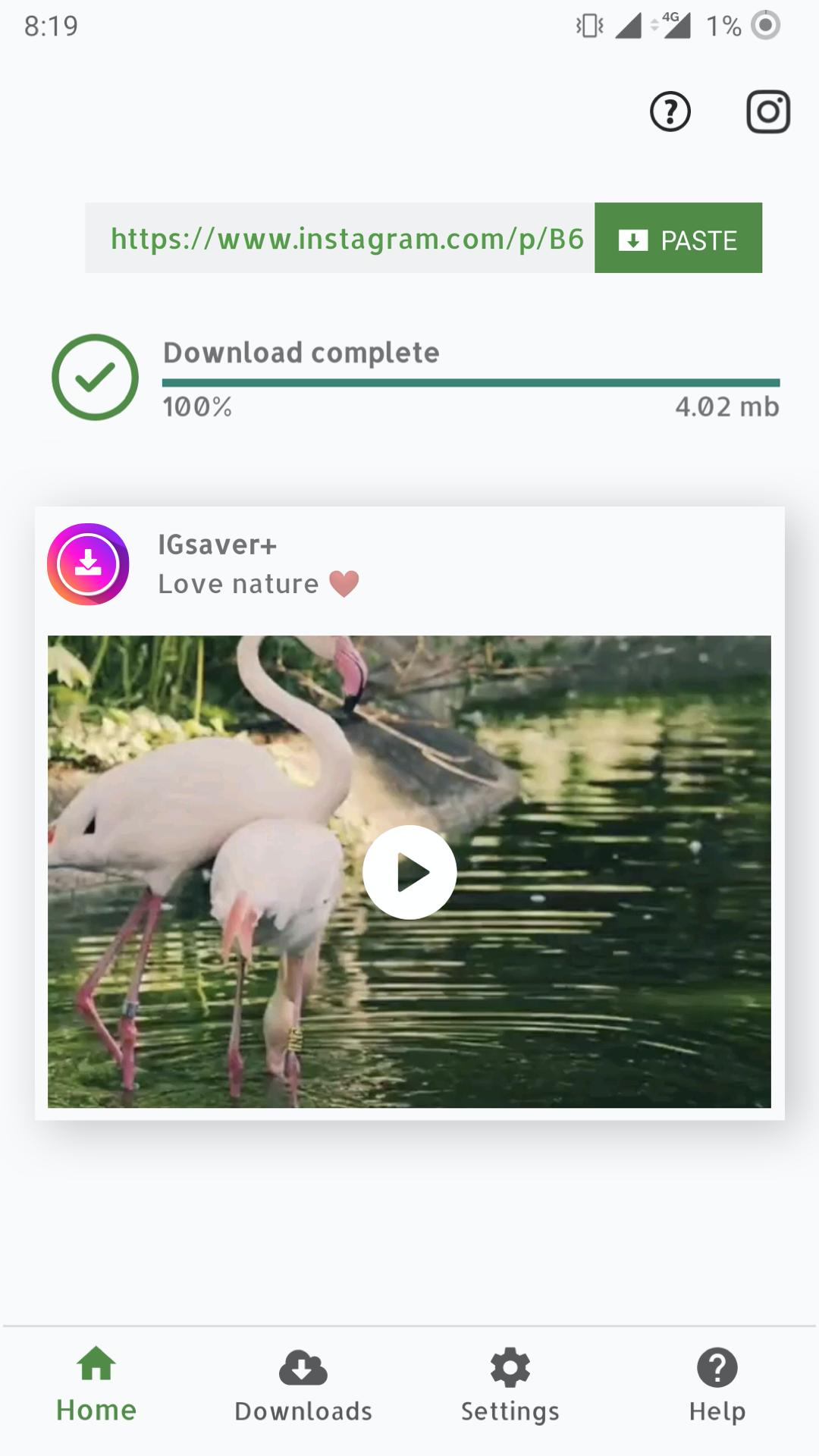
👉 Now open Video downloader for instagram : IG saver+ app and click on paste link. Your post will start downloading suddenly. You can see your download progress also.
When your download is complete. One the first page itself, there is the downloaded video or photo. You access that by click on the thumbnail itself.
You don't need to worry about anything. Because, inside Instagram video downloader, it has really very easy navigation inside this app at the bottom.
How to see list of photos or downloaded items ?
To check your downloads, open Video downloader for instagram and click on "my download" option from the bottom navigation bar. All images and videos with their dp are list there. There are also two options to show your downloads. You can either choose list or grid, depending on your choice.
It need some permissions to download instagram videos so kindly provide those before proceeding.
How to delete saved items in downloads ?
You can quickly delete your saved items. Just click on delete button and That's it. In order to share or repost. Click on share button and choose your destination app.
In settings, there some info about your phone and Video downloader for instagram app.Like, It will tell you how much storage is free inside your smartphone. And, also how much of space this app is using. If you with, you can delete all your downloads from their too.
It has inbuilt video player. Hence you don't need to use an external player. It can play your videos inside it too.
Below are the main highlights of this Instagram video downloader app.
👉 You can grab photo and repost it.
👉 Nice visual of saved items.
💾 Quickly delete downloaded items.
💾 You can download video from instagram with progress bar in one click.
👉 View the original post from the Instagram video downloader app itself.
👉 Share downloaded contents with the owner permission.
📺 View saved content in list with large thumbnails.
❤️ Also, see your downloads in grid with small and beautiful thumbnails.
👉 Click on share post and Video downloader for Instagram to save any photo or video.
Disclaimer:-
- This app is not associated or affiliated to Instagram in any way.
- Please have permission of the post owner before repost, share ow download them
- We are not responsible for any intellectual property violation that results from an unauthorized repost of a video or photo
- According to the Instagram user copyright procedures, You need to have permission for the owner of the video or photo in order to repost them.
Visualizar
Em formação
Desenvolvedor
UniQ Software
Última versão
2.5
Ultima atualização
2020-02-22
Categoria
Video-players-editors
Disponível em
Google Play
Mostre mais
Como jogar Video downloader for Instagram : IG saver+ com GameLoop no PC
1. Baixe o GameLoop do site oficial e execute o arquivo exe para instalar o GameLoop.
2. Abra o GameLoop e procure por “Video downloader for Instagram : IG saver+”, encontre Video downloader for Instagram : IG saver+ nos resultados da pesquisa e clique em “Install”.
3. Divirta-se jogando Video downloader for Instagram : IG saver+ no GameLoop.
Minimum requirements
OS
Windows 8.1 64-bit or Windows 10 64-bit
GPU
GTX 1050
CPU
i3-8300
Memory
8GB RAM
Storage
1GB available space
Recommended requirements
OS
Windows 8.1 64-bit or Windows 10 64-bit
GPU
GTX 1050
CPU
i3-9320
Memory
16GB RAM
Storage
1GB available space