Camera One: Wear, Galaxy Watch para PC
Shuisky
Baixe Camera One: Wear, Galaxy Watch no PC com o emulador GameLoop
Camera One: Wear, Galaxy Watch no PC
Camera One: Wear, Galaxy Watch, vindo do desenvolvedor Shuisky, está rodando no sistema Android no passado.
Agora, você pode jogar Camera One: Wear, Galaxy Watch no PC com GameLoop sem problemas.
Faça o download na biblioteca GameLoop ou nos resultados da pesquisa. Chega de ficar de olho na bateria ou fazer chamadas frustrantes na hora errada.
Apenas aproveite o Camera One: Wear, Galaxy Watch PC na tela grande gratuitamente!
Camera One: Wear, Galaxy Watch Introdução
Camera One app allows controlling phone cameras through Galaxy Watch or Wear OS smartwatches.
Use cases:
• Selfie or Group photo
• View and record video
• Listen and record audio
• View hard-to-reach places
• Security system
• Baby Monitor
Features:
• Camera: Rear or Front (swipe up|down)
• Photo | Video sizes
• Take a Photo | Video by turning the wrist
• Listen to phone sound
• Audio | Sound | Voice recorder
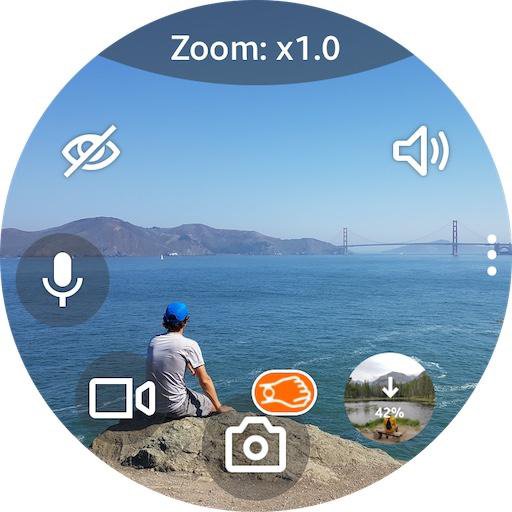
• Zoom, Flash, Exposure, WB, Filters, HDR, ... (use bezel)
• Time-lapse video: x4, x8, x16, x32
• Timer: 2, 5, 10 secs
• Power saving mode
• Buttons layout styles
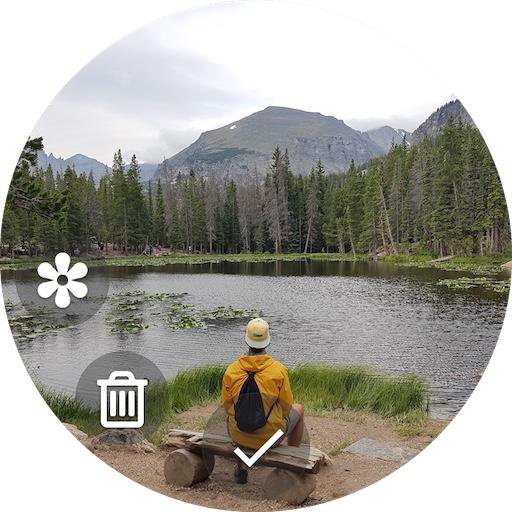
• Save copies of photos on the watch
• Save files on the SD card
Works even when the phone screen is off!
All settings are available on your smartwatch.
How to change Zoom, Flash, Exposure, WB, Filters, HDR:
Tap on the top of the screen where is written ‘Zoom: x1.0' to change the bezel mode: Zoom > Flash > Exposure > WB > Filter > ...
Then rotate the bezel to select the value.
For watches without bezel: swipe left | right (any screen area).
For flash: rotate the bezel to select the flash mode: auto | on | off | torch
Sound toggle:
If you don’t hear sound after turn on, go to smartwatch settings - Sound and vibration - Volume - Media (increase it)
Favorite button:
Long tap Sound toggle to switch: Self-Timer <-> Voice recorder (Audio recorder | Sound recorder)
Audio files are saved in: Phone storage \ Voice Recorder.
Taking Photo (video) by turning the wrist:
Turn On/Off - long tap on the photo (video) icon
Also works when the app running in the background
FAQ/Notes:
1. Swipe up or down to switch cameras.
2. High battery consumption?
• After you finish using the app so that it closes completely and no longer consumes battery and stops using the phone's camera, you should close the app using the "Back" button (bottom on the Galaxy Watch), not the "Home" one (top on Galaxy Watch) which will allow the app to continue running but in the background.
3. Connection issue?
• Tap "Settings / Permissions" inside the Camera One app on the phone and follow the instructions.
• Try to uninstall the Camera One app from your phone, install it again, and grant all the permissions the app asks you to. And you should allow everything, not just some of the requested ones, in order for the app to work correctly; and do not change the default app settings, until you check.
Try Premium version for free during the trial period and Buy it later (inside the 'Camera One' app on your phone) when you check out all the functionality and are completely satisfied. If you have any issues, email me at camera.shu@gmail.com and/or use Free version with limited functionality.
Visualizar
Tag
FotografiaProdutividadeTabuleiroEm formação
Desenvolvedor
Shuisky
Última versão
208
Ultima atualização
2025-08-10
Categoria
Fotografia
Disponível em
Google Play
Mostre mais
Como jogar Camera One: Wear, Galaxy Watch com GameLoop no PC
1. Baixe o GameLoop do site oficial e execute o arquivo exe para instalar o GameLoop.
2. Abra o GameLoop e procure por “Camera One: Wear, Galaxy Watch”, encontre Camera One: Wear, Galaxy Watch nos resultados da pesquisa e clique em “Install”.
3. Divirta-se jogando Camera One: Wear, Galaxy Watch no GameLoop.
Minimum requirements
OS
Windows 8.1 64-bit or Windows 10 64-bit
GPU
GTX 1050
CPU
i3-8300
Memory
8GB RAM
Storage
1GB available space
Recommended requirements
OS
Windows 8.1 64-bit or Windows 10 64-bit
GPU
GTX 1050
CPU
i3-9320
Memory
16GB RAM
Storage
1GB available space